aiai-agentclaude-codeagentic-aillm
How to optimize your AI cost?
Parminder PoonianAugust 8, 202616 min read

How to optimize your AI cost?
 LLM cost running high!!
We have all faced this. You give your AI coding agent a normal task, let it work for some time, and suddenly a large part of your hourly or weekly limit is poof gone.
Sometimes, we even stop using the best model because we do not want to exhaust the limit. This saves usage, but often at the cost of getting a worse result.
I mostly use Codex through ChatGPT Plus and the OpenCode Go subscription. Both have usage limits, so in past few weeks I have been exploring ways to optimize these costs. I started looking into where all those tokens actually go and what can be done about it.
There is no single tool that solves everything. But with a combination of better habits and a few open-source tools, you can reduce usage without losing much quality.
The important part is knowing what tpu9o o remove and what not to remove.
LLM cost running high!!
We have all faced this. You give your AI coding agent a normal task, let it work for some time, and suddenly a large part of your hourly or weekly limit is poof gone.
Sometimes, we even stop using the best model because we do not want to exhaust the limit. This saves usage, but often at the cost of getting a worse result.
I mostly use Codex through ChatGPT Plus and the OpenCode Go subscription. Both have usage limits, so in past few weeks I have been exploring ways to optimize these costs. I started looking into where all those tokens actually go and what can be done about it.
There is no single tool that solves everything. But with a combination of better habits and a few open-source tools, you can reduce usage without losing much quality.
The important part is knowing what tpu9o o remove and what not to remove.
Where Does Most of the Cost Go?
Most tokens are not spent writing your code. They are spent helping the agent understand your repository and what is happening inside it. Before changing one function, an agent may:
- Read multiple source files
- Load Skills, Agents.md and other instructions
- Run Git commands
- Execute tests
- Read logs and stack traces
- Call MCP tools Repository exploration is one of the biggest hidden costs. The same model usually searches the codebase and solves the problem, which means all the exploratory reads remain in its context. Tool output is another major source of waste. A 5000 line test result does not disappear after the agent reads it. It becomes part of the conversation and may be sent back to the model in future calls. The tools below attack different parts of this problem.
Tools That Reduce Agent Token Usage
Headroom
Headroom is probably the most complete option, but also one of the more complicated ones. It sits between your agent and the model and optimizes the context before it reaches the model.
How it works
Headroom chooses a compression strategy based on the type of content:
- Cache Aligner: Moves dynamic content towards the end so more of the prompt can be cached.
- SmartCrusher: Removes repetitive information from logs and structured data.
- Code Compressor: Reduces source-code context while preserving useful structure.
- Content Router: Selects a suitable compression method for each input. It can be used as a library, proxy, MCP server, or agent wrapper. The project currently reports different savings depending on content type rather than claiming one fixed reduction across every workload.
- Quick-start guide Installation starts with:
pip install "headroom-ai[all]"
I would recommend asking your coding agent to read the documentation and configure it. There are enough options that it is easy to make a small configuration mistake. The main benefit is that Headroom handles multiple sources of waste instead of only terminal output. The risk is that some of its compression is lossy. A line that looks unimportant can occasionally be the line that explains the bug.
RTK — Rust Token Killer
RTK is probably the easiest tool to recommend! It acts as a wrapper around common terminal commands and filters their output before it reaches the model.
How it works
Instead of sending the complete output of command outputs, RTK keeps the important parts, such as failures, warnings, changed files, and useful summaries. It is rule-based, so it does not require another LLM call, fancy embedding or DB queries to summarize the output. The project reports reductions of roughly 60–90% for supported command output. That does not mean your complete agent bill will fall by 90%! It only applies to the output RTK processes.
- Installation guide One installation method is:
cargo install --git https://github.com/rtk-ai/rtk
The main limitation is coverage. RTK only helps with commands and output formats it understands. It will not reduce tokens spent reading source files, calling unsupported tools, or carrying old conversations. Still, it is simple enough that adding it is usually a good idea.
Caveman
Caveman takes the simplest possible approach: make the agent talk less.
How it works
It adds skills that tell the agent to remove filler, explanations, pleasantries, and repeated context from its responses while preserving code, commands, paths, and error messages. It also includes tools for:
- Compressing files such as Claude.md
- Shrinking MCP tool descriptions
- Creating shorter commit messages and reviews
- Running smaller specialist subagents This mainly reduces output tokens. It does not magically reduce all the file reads, tool calls, or reasoning happening before the answer.
- GitHub repository One important caveat: the repository savings should be taken carefully. An Independent JetBrains benchmark measured only an 8.5% reduction in output tokens on realistic agent tasks, much lower than the highlighted numbers on their repository. The agent still needs to think, inspect files, and run tools even when its final response is very short. I would use Caveman when agents are too chatty, but not as the main solution for a context-heavy coding workflow.
Ponytail
Ponytail tries to reduce a different kind of waste: unnecessary code. Its idea is basically to make the agent behave like a lazy senior engineer (like me 😄) who prefers the smallest working change instead of building an entire framework for every task.
How it works
Ponytail adds a set of rules and review gates that push the agent to:
- Reuse existing code
- Avoid speculative abstractions
- Delete unnecessary code
- Prefer small diffs
- Question whether a requested component is needed
- Stop once the requirement is satisfied This can reduce both generated code and the number of follow-up iterations required to review or fix over-engineered solutions.
- Project website Ponytail is less of a token compressor and more of a behaviour-changing skill. That distinction is important. RTK reduces the output of a command. Ponytail tries to prevent the agent from writing 500 lines when 50 would do. It is useful for feature work and refactoring, but I would be more careful when the task genuinely needs a broad architectural change. The “smallest possible solution” is not always the correct long-term solution!
Context Mode
Context Mode takes a more aggressive approach. Instead of placing complete tool outputs into the active conversation, it stores them locally and lets the agent search them later.
How it works
Context Mode stores the output in SQLite, keeps a small representation in context and then model has to use SQL queries to extract the parts of original output. This works well for:
- Large logs
- Documentation
- Large JSON responses The project reports context reductions of up to 98% for some large tool outputs, but take that with a pinch of salt. 98% loss in context could mean losing a lot of useful information. Be cautious what you are signing up for! :)
- setup instructions The downside is that the agent may not know what it needs to search for. If an important warning is hidden inside a massive log and never appears in the small preview, the model may never realize that it should retrieve it. Context Mode can save more tokens than basic filtering, but it also has a higher chance of hiding useful information.
LLMLingua
LLMLingua is an open-source prompt-compression project from Microsoft.
How it works
It uses a smaller model to identify less important words, sentences, or sections and removes them before sending the prompt to the main model. Unlike RTK, it is not limited to predefined command formats. It tries to understand the semantic importance of the text. The original LLMLingua research reported compression of up to 20× on its evaluated datasets with limited performance loss. Those results came from specific natural-language tasks and should not be assumed for every coding workflow.
- GitHub repository
- Microsoft Research project
- Original research paper Installation:
pip install llmlingua
It is useful for long documents, RAG results, research context, and natural-language prompts. I would be more careful using it on source code, exact errors, API contracts, or tool-call arguments. Semantic compression may preserve the general meaning for complete files but for source code, it might not have enough context to make the right judgement. Nevertheless I like how dynamic it is.
LeanCTX
LeanCTX is a local context-management layer for AI agents. It tries to control what the agent reads, what gets compressed, what is remembered, and what gets passed to the model.
How it works
LeanCTX runs as a local Rust binary between the coding agent and the resources it accesses. It can:
- Compress terminal output
- Store project memory
- Reduce repeated context It supports multiple MCP-capable coding agents, including Codex, Claude Code, Cursor, and GitHub Copilot. Useful links:
- Project website Its biggest advantage is coverage. It targets repository access, memory, and tool output instead of solving only one part of the problem. Its disadvantage is complexity. You are adding another major layer between the coding agent and the LLM. This makes more sense for heavy and repeated use than for occasional small tasks.
Aider Repository Map
Repository maps are not exactly token compressors, but they reduce how much exploration the agent needs to perform. Aider is one of the best-known implementations.
How it works
Aider creates a compact map containing important:
- Files
- Classes
- Functions
- Call signatures
- And their relationships The agent first sees this structural overview and then opens only the files that look relevant. Aider selects parts of the codebase that fit within a configurable token budget.
- Installation guide Installation:
python -m pip install aider-install
aider-install
Repository maps work best as navigation aids. They should not replace reading the actual implementation once the relevant files have been found.
FastContext
FastContext is a Microsoft research project that separates repository exploration from problem-solving.
How it works
A smaller specialized agent explores the repository first. It returns only relevant file paths and line ranges to the main coding agent. The expensive model can then solve the task without carrying the complete search history. In Microsoft’s evaluation, FastContext reduced coding-agent token usage by up to 60% while improving resolution rates by as much as 5.5 percentage points on the evaluated benchmarks.
- GitHub repository
- Research paper This is a promising approach because repository exploration does not always require the strongest model. It is currently more research-oriented than RTK or Headroom, so it may not be the most plug-and-play option for regular users.
Squeez
Squeez is another tool-output compressor, similar in spirit to RTK but with broader compression features.
How it works
It hooks into supported coding-agent CLIs and compresses information before it enters the model’s context. It can:
- Compress verbose shell output
- Return only code signatures instead of complete files
- Remove information already returned by earlier calls
- Compress MCP tool output
- Learn compact handling rules for repeated command patterns It currently supports hosts such as Claude Code, Codex CLI, OpenCode, Gemini CLI, and Copilot CLI. Useful links:
- Installation and documentation The most interesting feature is cross-call deduplication. Even individually small outputs become expensive when the agent receives the same information again and again. Squeez tries to avoid repeatedly injecting content that is already present in the session. It reports very high compression for some Bash outputs, but, as usual, that does not mean your total coding-agent usage will fall by the same percentage. Compared with RTK, Squeez is broader and more dynamic. RTK is simpler and more deterministic. I would start with RTK and consider Squeez when repeated file reads, MCP output, or duplicated results are still a major issue.
Token Savior
Token Savior combines code navigation, terminal-output compression, and persistent memory in one MCP server.
How it works
It indexes the repository by symbols such as functions, classes, imports, callers, and dependencies. Instead of reading complete files, the agent can ask questions such as:
- Where is this function defined?
- What calls this method?
- Which files depend on this class?
- What changed around this symbol?
- Which previous session decisions are relevant? It also compacts common Bash output and stores useful information across sessions. Useful links:
- GitHub repository The trade-off is complexity. It adds an indexing and memory layer that the agent has to use correctly. Its reported savings are impressive, but they come from the project’s own benchmark. I would treat them as a reason to test it, not as a guaranteed result.
Code Context Engine
Code Context Engine, or CCE, focuses on reducing repeated repository reads.
How it works
It indexes your codebase locally and exposes the index to coding agents through MCP. Instead of repeatedly opening complete files, the agent can search the index and receive only the relevant symbols, relationships, and code snippets. It works with agents such as Codex, Claude Code, Cursor, GitHub Copilot, Gemini CLI, and OpenCode. Useful links:
- GitHub repository
- Documentation
- CLI reference The project reports up to 94% token savings in its benchmark. As with other project-reported numbers, this should not be treated as a guaranteed reduction for your workflow. CCE is a good option when source-code exploration is the main cost. It will help less when most of your usage comes from long conversations or verbose terminal output.
Built-In Compaction
Most coding agents provide some form of session compaction or summarization.
How it works
The agent summarizes older messages and replaces the complete conversation with a shorter version. This helps when the session is approaching its context limit or when you want to move between phases of a task. But compaction is lossy and also costs tokens to perform. It may forget:
- Exact error messages
- Why an approach was rejected
- Small requirements
- File paths
- Unresolved concerns
My rule is simple:
Compact at a task boundary, not in the middle of debugging.
Compaction is useful for continuing work. It should not be treated as a free cost-saving button.
How Do These Tools Compare?
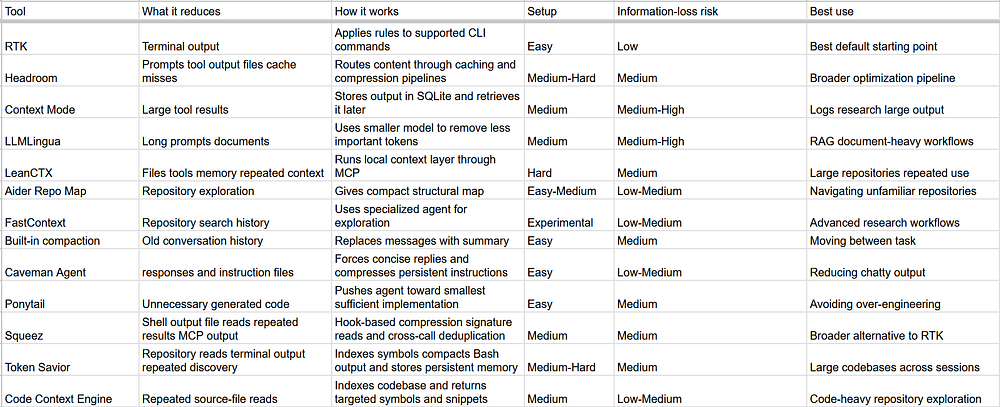 Overall View of all the tools
My Current Ranking
For most people, I would use them in this order:
1. RTK or Squeez
It is simple, deterministic, and targets obviously wasteful terminal output. Just go for it without worries. Try Squeez if you also want signature-only file reads, repeated-output deduplication, and MCP output compression.
2. Better Repository Navigation
Use targeted searches and repository maps so the agent does not read 20 files when it only needs three functions. Aider’s repository map is a good example of this approach. You can also explore making knowledge graphs with Graphify or Graphiti.
3. Headroom
Use Headroom when you want a broader optimization pipeline and are willing to spend some time configuring it.
4. Context Mode
Use Context Mode when large tool outputs are taking over the conversation.
5. PonyTail
If you consistently see overengineering in your model’s outputs, try Ponytail to nerf it down, while also saving cost.
6. LeanCTX
Consider LeanCTX for larger repositories or regular agent-heavy development.
7. LLMLingua
Use LLMLingua for document-heavy workflows, but I would not make it the default compressor for code or exact debugging output.
8. Caveman
If you want to decrease the chattiness of your agent, you can install caveman skills. I personally find the caveman output very hard to understand as a human, so I generally do not prefer it.
What Does the Research Say?
The research broadly suggests four things:
1. Repository exploration is expensive
A large portion of tokens is spent just finding the right code.
- Solution: Delegate exploration to a smaller agent
- Example: FastContext research paper
2. Prompt compression works best on natural language
Compression techniques perform well on:
- Documentation
- RAG results
- Research context But they are less reliable for:
- Source code
- Exact errors
- API contracts
- Example: LLMLingua research paper
3. Compression always has trade-offs
Removing tokens can also remove:
- Critical error lines
- Edge-case logic
- Important constraints More compression is not always better.
4. Long sessions accumulate hidden cost
Old context keeps getting carried forward.
- Solution: Start fresh sessions between phases
- Reference: GitHub optimization guide
Key takeaway
Removing obvious noise is good. Removing potentially useful information is a trade-off.
Good Habits That Cost Nothing
Before installing ten different plugins, try to adopt these habits, these will go a long way!
Keep AGENTS.md Small
Only include instructions the agent regularly needs:
- Build and test commands
- Important repository structure
- Unusual coding rules
- Files it should not modify
- Required validation steps Do not add generic instructions such as “write clean code.” Those tokens get included repeatedly without adding much value. The AGENTS.md website contains examples of what a focused agent-instruction file can look like.
Be more specific for the search zone
Instead of saying: “Read the authentication module.” say: “Find where access tokens are validated in XYZ service and inspect only the relevant code.” Start narrow and expand only when needed.
Limit Output at the Source
Prefer giving commands instead of dumping logs manually. Give URLs, MCP instructions or commands over dumping the complete output into the context. Those logs will not get compressed and can bloat the context by a large margin.
Keep Agent Responses Short
Ask the agent to report only:
- Files changed
- Tests run
- Remaining issues Long explanations cost output tokens immediately and become input tokens in every future turn. A simple way is to ask model to be “reply in concise manner.”
Start Fresh When the Task Changes
Do not carry a database-design discussion into a frontend-debugging task. Ask for a short handoff and start a new session. GitHub also recommends separating work into scoped phases so unrelated context does not keep moving forward.
Use Cheaper Models for Exploration
Searching for files, formatting code, and following a clear implementation plan usually do not require the most expensive model. Use stronger models for architecture, concurrency, security, and difficult debugging. Do not go too cheap, though. Five failed attempts can cost more than one successful request to a better model.
Final Thoughts
The goal is not to minimize tokens at any cost. The goal is to remove tokens that do not help the agent finish the task. I would optimize in this order:
- Keep instructions and responses short.
- Use targeted commands and searches.
- Filter noisy terminal output with RTK.
- Improve repository navigation with tools such as Aider.
- Use caching and broader compression through Headroom.
- Store massive outputs outside the active context with Context Mode.
- Apply lossy compression only when simpler methods are not enough. Aggressive compression can make your agent cheaper. It can also make it partially blind. The best setup is not the one that sends the fewest tokens. It is the one that sends the smallest amount of context required to complete the task correctly.
Ready to put this into practice?
Book a 1:1 mock interview with a FAANG engineer, or work through free interview questions with a live code editor.