system-design-interviewredisinterviewdistributed-systemscoding
Caching in System Design Interviews: A Deepdive
Parminder PoonianAugust 11, 202612 min read

Caching in System Design Interviews: A Deepdive
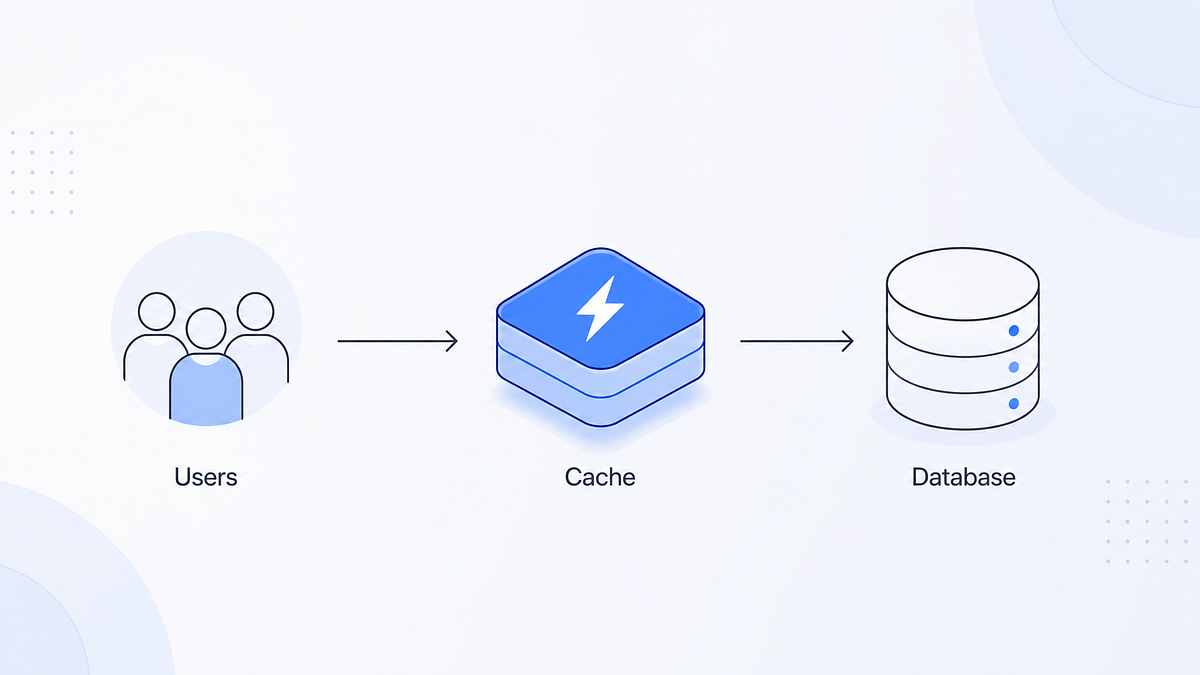 Most developers hear “cache” and picture Redis. In a system design interview, the interviewer wants to hear you identify the layers, justify the strategies, and explain what happens when they fail. By the end of this article, you should be comfortable deciding which one to use and when.
Why caching matters
Caching exists because latency and cost are not flat. Every access to a slower layer costs time and money, and a cache is a faster layer that stores copies of frequently accessed data so you skip the slow path most of the time. The latency ladder you should know by heart:
- CPU cache (L1/L2/L3) takes ~1–10 nanosecond
- In-process memory (HashMap read) takes ~1–100 microsecond
- Distributed cache (Redis, Memcached, Valkey) takes ~1–5 milisecond
- CDN edge read takes ~5–50 milisecond
- Database query on disk takes ~10–100 milisecond There are basically 2 reasons to cache,
- Latency. Serve hot data in milliseconds instead of tens of milliseconds. Putting a distributed cache in front of a database drops p99 latency from ~200 ms to under 5 ms.
- Database protection. Every cache hit is a query your database does not have to run. At high traffic, an uncached hot path will melt the database under its own read load. A cache is always a trade: you trade memory, complexity, and consistency for speed. “Caching is not free” (pkritiotis.io good read) it has operational cost, cold start cost, and correctness risk. Therefore you should understand what are you caching, where, with what policy, and what happens when it fails?
Layers of Caches
Caching happens at almost every layer of the stack. Think of them guarding each expensive resource from the client to the database.
- Client-side / browser cache. The browser stores responses locally using HTTP headers: Cache-Control (how long), ETag/Last-Modified (re validation), Expires. This works for static assets, images, and API responses. This saves bandwidth at origin i.e. your device and makes repeat visits fast. This has near zero risk, a stale or missing browser cache just means a re-fetch. Only issue is consistency, so you should version your data to invalidate the browser cache.
- DNS cache. DNS resolvers and operating systems cache name to IP address mappings with a TTL. This is why DNS changes take time to propagate — you cannot invalidate caches you do not control. This is good thing to know especially when you change record on name-servers.
- CDN / edge cache. A content delivery network (CloudFront, Cloud CDN, Cloudflare) stores copies of content at edge locations close to users. You should use it for static assets, images, videos, and even entire cached pages. Works via TTL plus cache keys (through URL, query params or headers). If the edge cache dies or misses, the request falls through to origin. You lose edge latency, but not availability. Invalidation is again the pain point similar to browser cache. Purging a CDN cache is slow and there is no real “update” operation, so versioned asset names (app-1b2c3d.js) are the standard trick.
- Reverse proxy / load balancer cache. Nginx, Varnish, and Envoy can cache responses at the edge of your application tier. An example article to read on this: DoorDash runs an Envoy proxy cache backed by Valkey at 1.5M RPS with 99.99999% availability. Use it to absorb read-heavy traffic before it reaches app servers.
- In-process / local cache. A per-node store inside your application process: a HashMap, Caffeine, Guava, or an in-memory LRU. This is the fastest possible application-level cache (microseconds). Caveat is, it dies with the process but rebuilding it is cheap because the source of truth is the database and the next request will replenish it. The real risk is cross-node staleness: two servers can serve different versions of the same key. Use it for immutable or near-immutable data (config, reference data), or combine with a distributed cache as a two-tier front.
- Distributed cache. A shared, network-accessible store: Redis, Valkey, Memcached. Every application server reads and writes the same cache, so it is the default answer for shared hot data in interviews. Works as a key-value store with TTLs and eviction policies. Fault tolerance is the big design decision here (more in the fault-tolerance section). Memcached is a pure cache (no persistence, multithreaded, simple) while Redis/Valkey add data structures, persistence, and replication, which is why people like Redis so much, it usually has a tool for your problem. Covering all tools will digress a lot from this article, so here is link to its documentation: https://redis.io/docs/latest/develop/data-types/
- Database-level caching. Databases cache internally: There is a buffer pool which holds hot pages in memory. Queries memoize their results, and read replicas are effectively a horizontal cache of the primary. It doesn’t stop there, we have materialized views, and services like DynamoDB DAX that sit in front of a store to cache the reads even further. Fault tolerance varies from database to database so there is no one hat fits all.
- The modern footnote: KV caches for LLMs. LLM inference now runs on caches too. Providers bill you less when your query hits the KV cache that stores computed attention keys and values, and prompt caches for repeated prefixes. For example, when you type “Tell me more about this concept.” it would charge you less for the initial conversation that is already cached in KV cache.
Caching strategies: how a cache stays coherent
There are five canonical patterns for writing to caches. This is very important to know.
- Cache-aside (lazy loading). The app checks the cache. If it misses, it reads from the DB and populates the cache. Similarly for writes, app writes DB, then invalidates (or updates) cache. This is eventually consistent; staleness window equals the TTL. This strategy is the default choice for read-heavy loads (product catalogs, profiles).
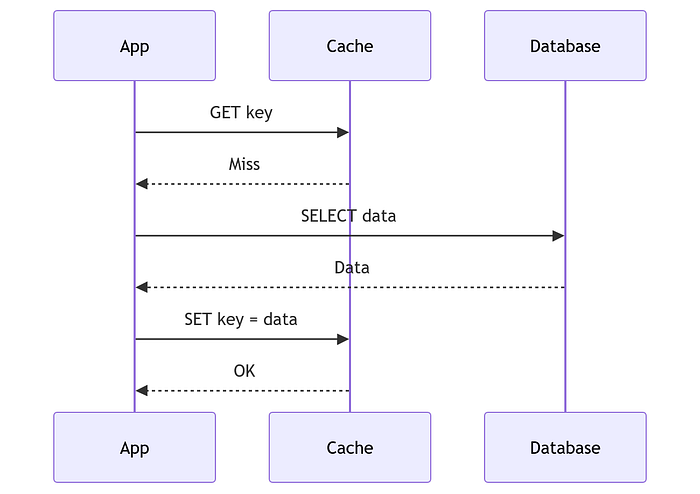
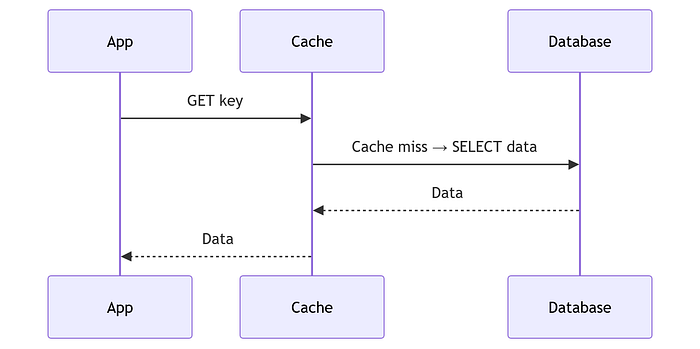
- Read-through. The cache itself loads from DB on miss. You need a specialized cache if you need this, as it requires Cache + DB integration. Write work same as cache-aside. Use this when you have the cache layer that can encapsulate your database. DynamoDB DAX + DynamoDB is an easy example.
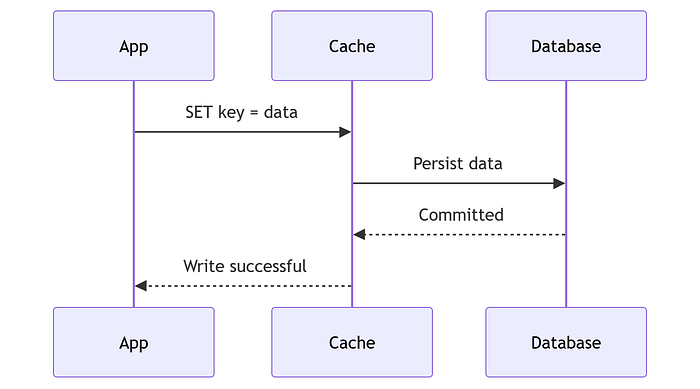
- Write-through. App writes cache AND DB before committing success. Again this requires a Cache + Database integration. This has stronger consistency as reads after a write see fresh data. Use this when you need read after write correctness (bank balances, inventory).
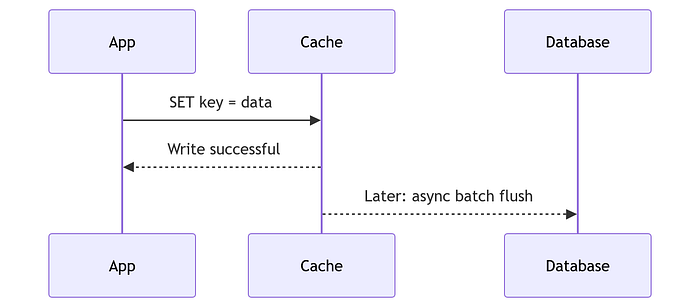
- Write-back / write-behind. Here we first write to the cache. It gets an acknowledgment, and the cache flushes to the DB asynchronously in batches. This has weak consistency. There is a data loss window if the cache dies before the flush. Use this for write-heavy load that the DB cannot keep up with. (metrics, logs, counters)
- Write-around. Here the app writes to the DB first. So write load should be less. The cache is populated lazily on the next read which means it will be stale until next read. Use this when writes are rarely read so that it avoids polluting the cache.
How to decide which one to use?
Identify the read/write ratio first.
- Reads dominate (95%+)? Cache-aside or read-through with TTL.
- Users read what they just wrote (dashboards, balances)? Write-through for those keys.
- Writes are extremely high (telemetry)? Write-behind, with the explicit caveat that you accept loss risk.
Eviction policies: what gets thrown out when the cache is full
When a new key arrives and the cache is full, something must leave. That decision is the eviction policy.
- LRU (Least Recently Used) — Evict the item not accessed for the longest time. (“if I did not use it recently, I probably don’t need it”).
- LFU (Least Frequently Used) — Evicts the least-accessed item. Better for stable hot data that is accessed constantly but in spikes (a celebrity profile, a leaderboard).
- FIFO — Evicts the oldest inserted item regardless of access. Simple, but throws away hot old data, rarely used.
- TTL (expiration) — This is not an eviction policy per se, but it is kind of mandatory and guides what would be evicted. Every key expires after a time-to-live. TTLs are mandatory in a cache. Always put a TTL!
- Random — Very cheap eviction with no assumptions. Random is actually fine for uniform access patterns, bad for spiky loads or when users access more recent data more often as it might evict hot keys. Redis/Valkey exposes the combination explicitly: volatile-lru evicts only keys that carry a TTL (protecting keys you marked as long-lived), allkeys-lru evicts anything, noeviction returns errors instead of evicting. More at: https://redis.io/docs/latest/develop/reference/eviction/
When NOT to cache in system design
This one is very important, repeat until you know it deeply. Avoid caching when,
- Data changes constantly (live inventory at per-second granularity, real-time positions). The invalidation churn costs more than the cache saves.
- Per-user unique data with no reuse. A cache hit rate near zero. There is no use of cache here as there are no repeats.
- Correctness-critical reads. If a stale value is unacceptable (payment status, auth decisions). You “can” cache here, but only with write-through plus a short TTL, or not at all.
- Security-sensitive data. Caches leak: this month’s RubyGems advisory was exactly this — API keys leaked via an improperly configured cache. Never cache credentials, secrets, or PII you are not allowed to store.
- Tiny datasets. If the whole table fits in the DB’s buffer pool, a separate cache layer is unnecessary.
- Hot keys that you cannot protect. One key hit by every request (a “celebrity key”) creates a stampede risk that needs explicit mitigation before you cache it.
- When invalidation is impossible. If you cannot reliably know when data changed (external data you do not control), a cache serves stale data forever unless the TTL is short enough to be honest. Real-world event from this month: Next.js 16 flipped its caching default — cache-everything became opt-in via use cache. The broader lesson is that silently serving stale or incorrect data can be worse than having no cache at all.
Fault tolerance: what happens when cache fails
Like any system, caches can also go down. Every cache layer has a failure mode, it can either fail open or fail close.
- Fail-open: On cache failure, requests go straight to the database. Keeps the system correct but hands the database a full traffic spike, which is exactly the load the cache was protecting it from.
- Fail-close: On cache failure, reject or degrade requests. Correct posture when a stale or bypassed cache would be worse than an outage (rate-limit enforcement, auth-adjacent data). How failures are handled at each layer:
- Browser/DNS/CDN caches: Failing costs a refetch or slower delivery, never data loss. This is why they are the safest caches. CDN falls through to origin.
- In-process cache: Dies with the process. This results in a cold cache, so you need to either wait or programmatically warm up the cache by re-reading hot keys from the DB. Cheap, but beware of the cold-start thundering herd (every node warming at once after a rolling deploy).
- Distributed cache: The interesting one. A single Redis node is a single point of failure and if it dies, the app must fail open to the DB, and the DB can be overwhelmed. That is why production setups replicate: Redis/Valkey Sentinel (automatic failover), Redis Cluster (sharding plus replication), and multi-AZ placement on managed services. Replicas give you read scaling and failover.
- Cache stampede / thundering herd: the classic distributed-cache failure. A hot key expires, and every concurrent request misses simultaneously and races to rebuild it, flooding the database. ByteByteGo calls this out as the pitfall that turns a cache into a database-killer. You can mitigate this by per-key locks (one requester rebuilds, others wait), request coalescing, jittered TTLs (stagger expiry with randomness), and background refresh (rebuild before expiry).
- Write-back durability: a write-back cache that dies before flushing loses acknowledged writes. The fault tolerance of write-back is you accept data loss on cache failure. That is why write-through or direct DB writes should be used anything that cannot lose data.
- Persistence options: Redis/Valkey can persist via snapshots (RDB) or append-only logs (AOF) so a restart does not start from empty. Persistence protects against restart, replication protects against node loss. The scale target to cite: DoorDash’s Envoy + Valkey proxy cache serves 1.5M RPS at 99.99999% availability — with enough replication and failover design, a cache layer can be MORE available than your database.
How to talk about caching in the interview (60-second script)
- Start with the problem. Estimate the read/write ratio and the latency budget. "This service is 95% reads and p99 latency must stay under 50 ms" - then and only then name the cache.
- Name the layer. "We cache at three layers: CDN for static assets, a distributed cache for shared hot data, in-process cache for per-node immutable data."
- Pick the strategy and defend it. Use cache-aside by default with TTLs. Write-through if consistency is important. Match it to the problem’s access pattern (LRU for temporal locality, LFU for stable hot keys).
- Own the failure mode before being asked. "If the cache dies we fail open to the database. We protect the DB from the stampede with per-key locks and jittered TTLs, and we run replicas with automatic failover so the window is seconds, not an outage." This gives interviewer an impression that you thought ahead in your design.
- Quantify. Hit rate targets you want to achieve (~95%+ on hot paths), the TTLs you would want to set and how eviction protects the system.
If this breakdown helped, follow for more system design interview breakdowns - and tell me which system design question you got grilled on. I’ll try to cover those next.
For Mock System Design Interviews and Mentoring Sessions I am available through: https://mentoxis.com/mentors/parminder-poonian
(Disclosure: Some of the research and thus the text was collated by AI tool which was later edited by me. To ensure correctness, some proofreading was also AI assisted.)
Ready to put this into practice?
Book a 1:1 mock interview with a FAANG engineer, or work through free interview questions with a live code editor.